Cross-Border F1 Rights: VPN Limits
A VPN can mask your IP but won't change F1 streaming rights—check subscription, billing, and territorial rules before you travel.

A VPN changes an IP address - not the right to watch F1 abroad. Before traveling, U.S. subscribers should check their provider’s travel rules and confirm access to live sessions and replays at their destination.
Access depends on 3 separate factors: broadcast rights, account eligibility, and location checks. Services may block VPN connections or restrict accounts for terms violations. Legal VPN use does not mean a streaming service permits it, and a terms violation is not automatically a crime.
EU travel portability does not give U.S. subscribers the same rights abroad. If a subscription does not cover the destination, the options are an official local broadcaster, an authorized public screening, or a permitted replay.
What a VPN Can and Cannot Change
A VPN routes your traffic through a remote server. The streaming service sees that server’s IP address, which may point to a different location. But changing your IP location doesn’t change your physical location, residence, or viewing rights.
The question is how the service reads your connection - not just whether the VPN works. Streaming services check more than your IP address.
IP Location vs. Viewing Rights
Location signals and account eligibility serve different purposes. F1 TV defines a subscriber’s Home Territory by their home country of residence. It may also verify the country where the subscription was purchased.
| Access factor | What a VPN may change | What remains unchanged |
|---|---|---|
| Apparent IP location | The IP address and region visible to the F1 streaming service. | Your actual location and residence. |
| Account eligibility and travel rights | Nothing. | Your Home Territory, plan, billing country, territorial restrictions, stream limits, and eligibility under travel policies or applicable law. |
| Local law | Nothing. | The laws governing access where you are physically located. |
EU portability rules let eligible residents use their home service while temporarily traveling in the EU. Those rules do not extend U.S. F1 access abroad.
Playback may work even when your account fails the provider’s rights check. Check the provider’s current travel policy before you leave. The next access check depends on that policy, not your VPN server’s location.
sbb-itb-7c68254
Subscription Rules and Local Laws
IP masking is only part of the picture. Your subscription terms and local law also govern where you can watch.
Legal VPN use does not necessarily mean permitted streaming use. F1 TV grants limited use under its terms, including limits on where you can access the service.
Residence Requirements and Travel Limits
F1 TV’s terms define the country of purchase as your Home Territory. Changing your IP address does not change that. The service may check your country during sign-up and use payment-card details to verify your residence and billing country. Provide accurate account and billing information, and keep your confirmation email or receipt.
EU portability can apply to eligible residents in covered territories. U.S. subscribers, however, do not receive that same baseline portability when traveling abroad.
For a U.S. account, check which features your destination allows, not just whether F1 TV is available there. Live video, replays, and other services can vary by territory. Before departure, review the current U.S. availability page and your plan terms. Contact support if the destination’s rules are unclear. A stream that plays does not prove you’re entitled to watch it.
A working VPN connection is one thing; what the service checks against your account is another.
Playback Blocks, Account Penalties, and Legal Risks
Even if a stream loads, F1 TV can still block playback or restrict your account.
A playback block stops a stream or feature. Suspension or termination affects the account itself. F1 TV also requires email verification to keep watching; without it, you’ll be signed out. VPN detection alone does not prove that your account has been suspended or terminated.
A terms violation is not automatically a crime. Legal risk depends on local law and any separate unlawful conduct. Check the law where you are. If playback fails or you receive an account warning, read the notice and contact support.
How Streaming Services Verify Access
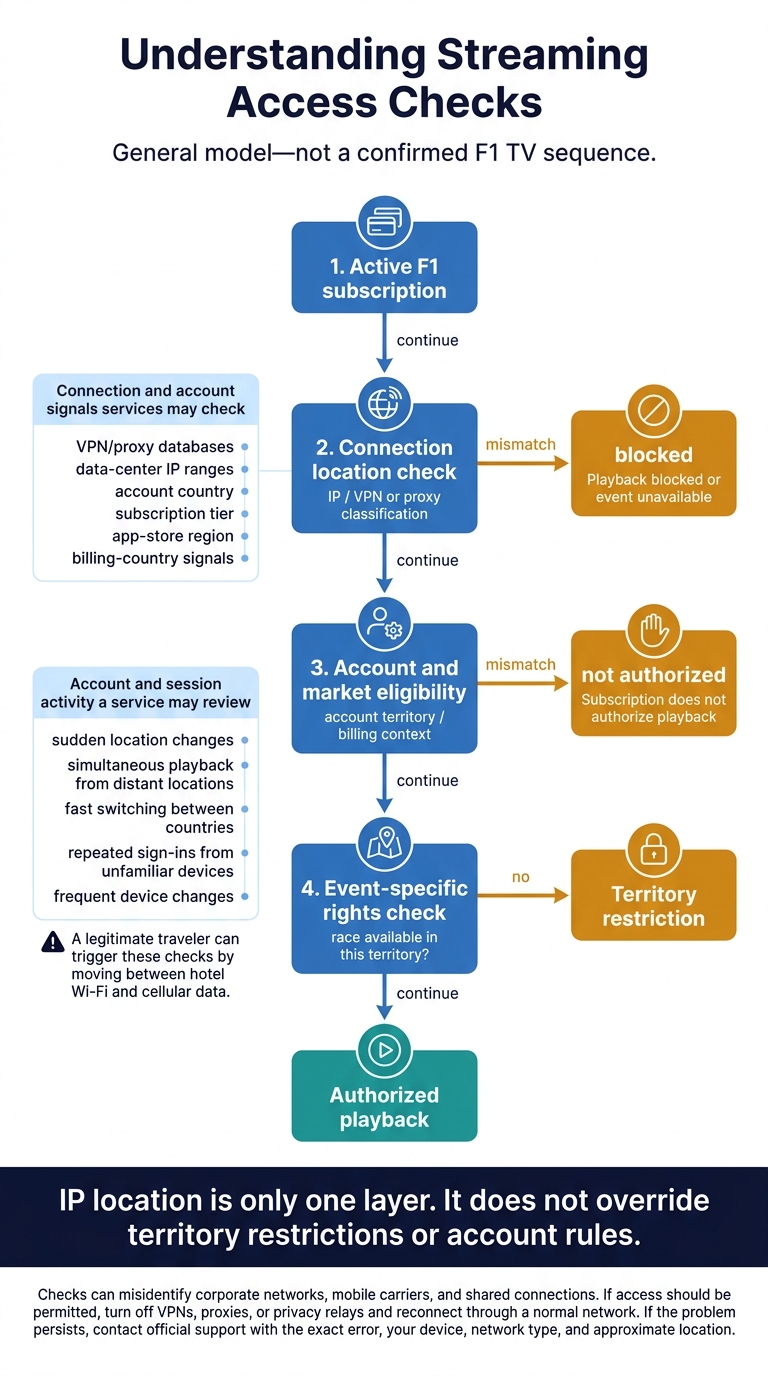
F1 Streaming Access Checks: Why a VPN Isn’t Enough
Streaming services enforce access through device and account checks, not just contract terms. IP location is only one layer. It does not override territory restrictions or account rules.
IP Address, Account, and Payment Checks
Services may compare IP addresses with VPN/proxy databases and data-center IP ranges. They may also check account country, subscription tier, app-store region, and billing-country signals. Changing your IP location won’t resolve account, billing, or territory mismatches.
These checks can misidentify corporate networks, mobile carriers, and shared connections. If a connection that should have access is blocked, turn off VPNs, proxies, or privacy relays and reconnect through a normal network. If the problem persists, contact official support with the exact error, your device, network type, and approximate location.
Device Activity and Session Playback Checks
Passing an IP check doesn’t guarantee playback. A service may also review account and session activity, including sudden location changes, simultaneous playback from distant locations, fast switching between countries, repeated sign-ins from unfamiliar devices, and frequent device changes.
A legitimate traveler can trigger these checks by moving between hotel Wi-Fi and cellular data.
Keep your account credentials private, use supported apps, and avoid unnecessary simultaneous sessions.
The flow below shows how these checks can stack. It’s a general model, not a confirmed F1 TV sequence.
Active F1 subscription
          |
          v
Connection location check
(IP / VPN or proxy classification)
          |
          +------ mismatch ------> Playback blocked or event unavailable
          |
          v
Account and market eligibility
(account territory / billing context)
          |
          +------ mismatch ------> Subscription does not authorize playback
          |
          v
Event-specific rights check
(race available in this territory?)
          |
          +------ no ------> Territory restriction
          |
          v
Authorized playback
Conclusion: Check Viewing Rights Before You Travel
Plan for your destination, not the location your VPN shows. A VPN changes the IP address a service sees. It does not change your subscription rights, residence status, or local law. Even a lawful VPN cannot override a territorial licensing block.
Pre-Travel Checklist for U.S. F1 Fans
Before you leave:
- Check territory rules. Review Formula 1’s official coverage information for your destination, plus your subscription’s travel and residence rules. Don’t assume U.S. portability applies abroad.
- Confirm session coverage. Check access to practice, qualifying, Sprint sessions, the race, and replays. Save start times in your destination’s local time, accounting for daylight-saving changes.
- Get your account and devices ready. Check supported devices and simultaneous-stream limits. Update the app, test sign-in, and verify two-factor authentication before departure. Save official support details, and complete security checks only through the official app or website.
If access still fails, check the territory and session first. Review service notices, then ask support whether your access rights cover that country and session. If they don’t, use an authorized local broadcaster, an authorized public screening, or an official replay. Choose an option your access rights cover; paying for a subscription does not give you worldwide access.
FAQs
How can I confirm my viewing rights before booking a trip?
Before you book, check the official Formula 1 website or local broadcasters’ schedules to confirm who has live-session rights at your destination. F1 media rights differ by region.
Apple TV holds exclusive U.S. streaming rights, but geographic licensing and VPN restrictions may keep you from using your home subscription abroad. Don’t count on a VPN to get around regional limits: VPNs are often unreliable for this purpose, and stream verification systems may block them.
Can I use a VPN for privacy while watching abroad?
Using a VPN to watch Formula 1 abroad doesn’t always work - even if you’re using it for privacy. Streaming platforms use verification tools to detect and block VPNs to enforce geographic licensing and regional contract rules.
As VPN detection tools change, you may lose access to your home region’s content. Since official streaming services are limited to specific territories, you may need to watch through a local provider while traveling.
What proof should I provide if my access is wrongly blocked?
You can confirm your local residency status with the provider, but there’s no standard identity verification process that lets you bypass geographic licensing restrictions. Providers often use automated detection to enforce regional rights and contract rules.
If you think you’ve been blocked by mistake while traveling or living abroad, your options are generally limited to confirming your residency or, if you qualify, using the service’s free content tiers designed for broader access.