F1 TV Pro vs Access: Feature Comparison
Compare Pro vs Access plans: live race video vs live timing, replay delays, onboard feeds, device limits, and regional restrictions.
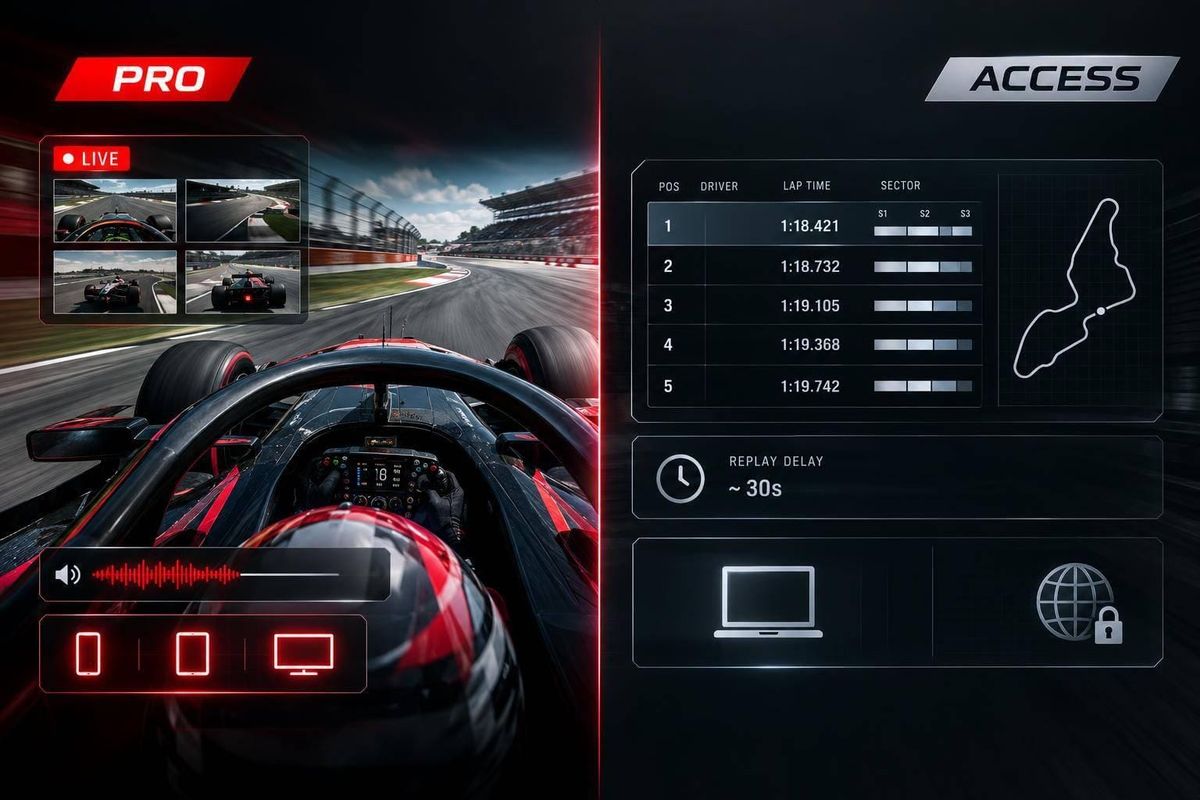
F1 TV Pro offers live race video. F1 TV Access offers live timing, with race replays arriving later - typically about 48 hours afterward in the U.S. Pro suits live viewing; Access suits fans who can wait.
Both plans include race data and more than 2,000 hours of archive footage. The comparison also covers onboard cameras, team radio, supported devices, viewing limits, and regional rules. Current U.S. prices and plan availability need checking before purchase.
Quick Comparison
| Feature | F1 TV Pro | F1 TV Access |
|---|---|---|
| Live session video | Yes, where available | No |
| Full-session replays | Immediate | Delayed; verify local timing |
| Highlights | Immediate | Immediate |
| Onboard cameras and team radio | Live and replay | Delayed replay only |
| Selectable video feeds | Yes | No |
| Live timing and driver tracking | Yes | Yes |
| Archive | 2,000+ hours | 2,000+ hours |
| Devices | Supported browsers, mobile apps, Roku, and Fire TV | Same |
| Registered devices | Up to 6 | Up to 6 |
| Simultaneous viewing | 1 live main race stream; secondary content on separate devices | Not specified |
| U.S. pricing and availability | Check current checkout details | Check current checkout details |
| Regional and travel limits | Local rights apply | Local rights apply |
Check local replay windows, device support, and travel rules before choosing. Six registered devices does not mean six streams at once.
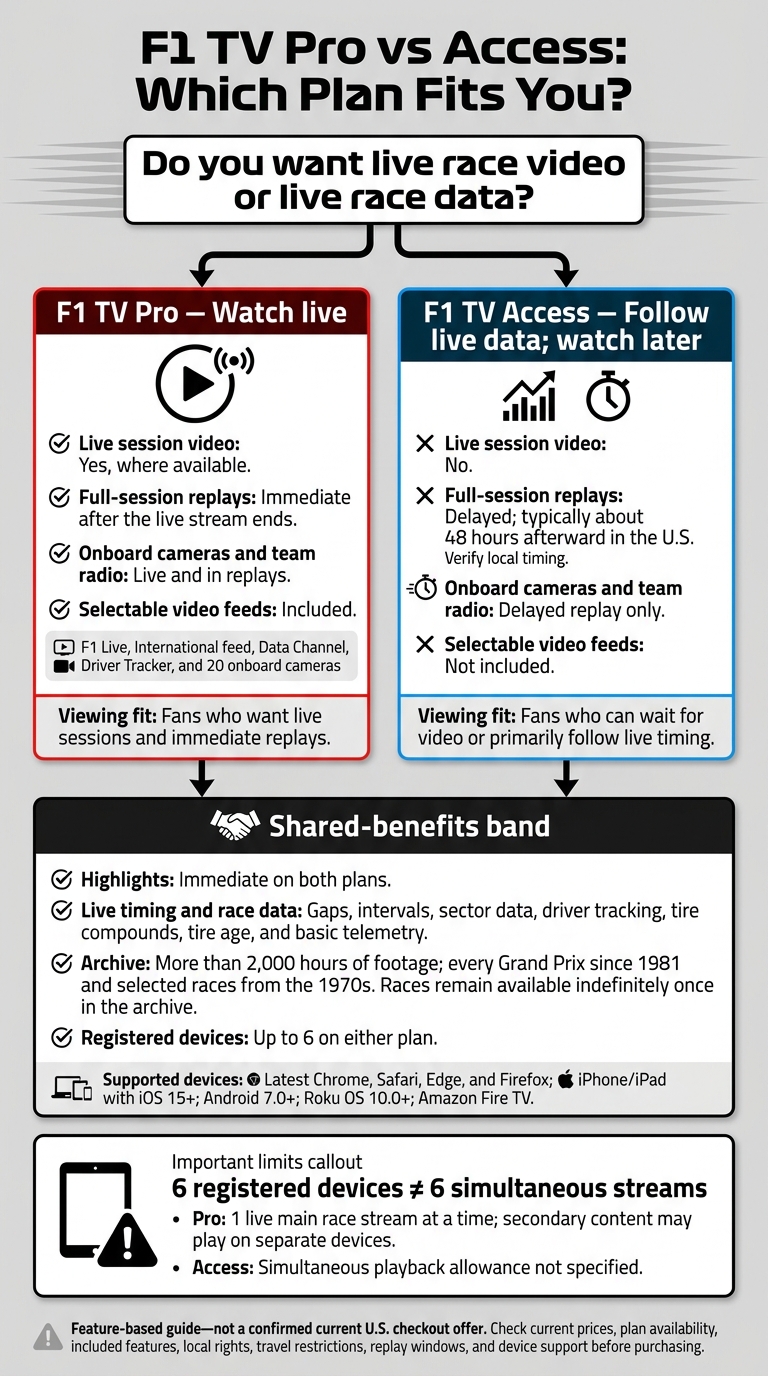
F1 TV Pro vs Access: Which Plan Fits You?
F1 TV Subscription Review 2026: $27 vs $85 vs Premium Plan Comparison
sbb-itb-7c68254
U.S. Prices and Plan Availability
The supplied sources did not confirm current U.S. prices or checkout availability. Focus on the feature comparison rather than an unverified checkout price.
What Each Plan Includes
The supplied sources also did not confirm which features are currently included in U.S. plans. Compare the features listed at checkout for each plan.
Regional Limits and Travel
Location affects access, too. F1 TV access depends on where you’re watching and the territorial rights agreements that apply there. These determine whether you can watch live video, view delayed replays, or access only timing data.
Live Video, Replays, and Race Data
The U.S. plan split comes down to live video versus live data. Pro includes live video and feeds. Access includes live timing data, but full-session video replays arrive later.
| Feature | F1 TV Pro | F1 TV Access |
|---|---|---|
| Live sessions | Live | Unavailable live |
| Full-session replays | Immediate | Delayed |
| Highlights | Immediate | Immediate |
| Onboard cameras and team radio | Live and in replays | Replay-only |
| Selectable feeds | Included | Not included |
| Live timing, sector data, and driver tracking | Live | Live |
Live Sessions and Replay Delays
With Pro, you can watch full-session replays as soon as the live stream ends. Access has a 48-hour wait. Highlights are available immediately on both plans.
Onboard Cameras, Team Radio, and Feed Selection
Pro lets you watch live onboard cameras, listen to live team radio, and choose between F1 Live, the International feed, the Data Channel, the Driver Tracker, and 20 onboard cameras.
Access includes onboard cameras and team radio only in delayed replays. It doesn’t include selectable feeds.
Live Timing, Sector Data, and Driver Tracking
Both plans provide live timing and race data, including gaps, intervals, sector data, driver tracking, tire compounds, tire age, and basic telemetry.
Archives, Devices, and Stream Limits
Beyond live viewing, the main differences are archive access and device limits.
| Feature | F1 TV Pro | F1 TV Access |
|---|---|---|
| Archive entitlement | Full F1 TV Archive access | Full F1 TV Archive access |
| Desktop browsers | Latest Chrome, Safari, Edge, and Firefox | Same supported browsers |
| Mobile apps | iPhone/iPad: iOS 15+; Android: 7.0+ | Same requirements |
| Confirmed TV devices | Roku OS 10.0+; Amazon Fire TV | Same |
| Registered devices | Up to 6 devices | Up to 6 devices |
| Simultaneous playback | 1 live main race stream at a time; separate devices may be used for secondary content | Not specified |
Archive Coverage and Replay Retention
Both plans include more than 2,000 hours of archive footage, covering every Grand Prix since 1981 and selected races from the 1970s.
Once a race enters the archive, it stays available indefinitely on both tiers. That gives fans a fallback when switching devices or returning to watch sessions later.
Device Registration and Simultaneous Streams
Registering six devices doesn’t mean you can watch six streams at once. Device registration and simultaneous viewing are separate limits.
F1 TV Access’s simultaneous playback allowance isn’t specified. F1 TV Pro allows one live main race stream at a time, while separate devices may show secondary content, such as onboard cameras, team radio, or live timing.
Conclusion: Which Plan Fits Your Viewing Habits?
Live video is the main difference. Access fits delayed viewing and live timing. Pro adds live video of every track session and immediate replays - but only where Pro is sold.
Use this table to match each plan to how you watch.
| Your viewing habit | Feature-based fit | What to verify |
|---|---|---|
| Watch sessions live | Pro covers every track session live; Access does not | U.S. Pro availability |
| Watch sessions after they finish | Pro offers immediate replays; Access offers delayed replays | Local replay delay |
| Follow race data without live video | Access includes live timing data | Required timing tools |
Before choosing, check local rights, travel restrictions, and replay windows, along with supported devices and stream limits, against your viewing needs.
FAQs
Can I upgrade from Access to Pro midseason?
Yes, you can upgrade from F1 TV Access to F1 TV Pro at any point during the season. With the upgrade, you get full live onboard camera feeds, complete live telemetry data, and an extensive race archive.
Will my subscription work when I travel abroad?
No. Your U.S.-based subscription won’t give you access to F1 content abroad. Apple TV’s exclusive F1 streaming rights apply only in the United States.
Apple TV is available in over 100 countries, but its F1 rights don’t extend beyond the U.S. If you’re watching abroad, you’ll need to use a local broadcaster or streaming platform.
How do I check my local replay delay?
There’s no viewer setting or interface that shows your local replay delay. For standard viewers, broadcast delay is built into the transmission - you can’t adjust it. Broadcast systems work to keep video, telemetry, and timing data in sync in near real time.
If syncing problems persist, check that your playback device and internet connection are set up to handle high-bandwidth streaming.