How F1 Data Modules Send Live Telemetry
Explains how F1 modules sample, package, and transmit prioritized live telemetry and why validating readings matters.
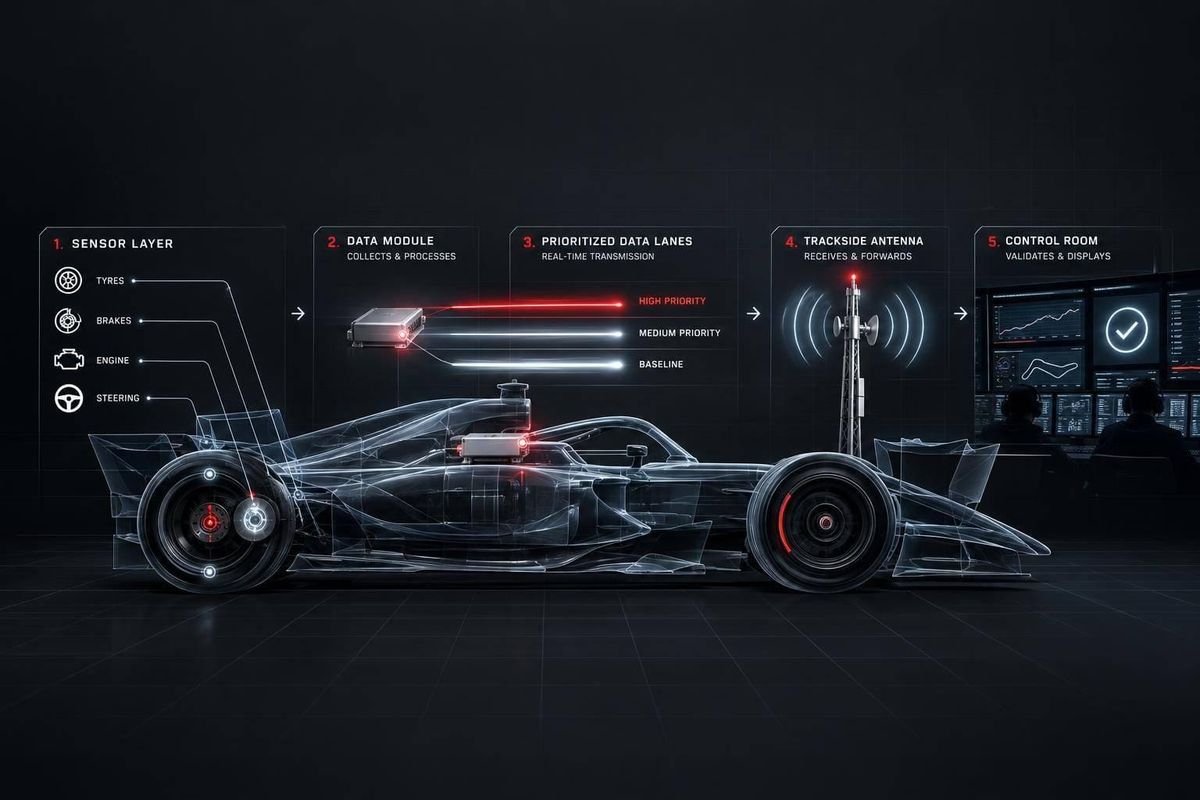
F1 data modules turn sensor signals into time-stamped data that a radio link sends to the garage. If a reading looks wrong, I’d check its source, timestamp, and link status before treating it as a car problem.
The key distinction? Live telemetry is only part of the record. The article cites about 30 MB sent per lap, compared with more than 1.5 TB generated over a race weekend.
Here’s how I break down the process:
- Prepare and sample: Match inputs to sensors, clean up electrical signals, and align measurements to one clock.
- Package and send: Label readings, prioritize live channels, check packets, and transmit them to trackside receivers.
- Display and review: Turn incoming data into screens and alerts for garage and factory teams, while keeping onboard logs for later wired transfer.
My main takeaway: <u>check the data before acting on it</u>. A delayed reading or lost packet needs a different response than a failing car part.
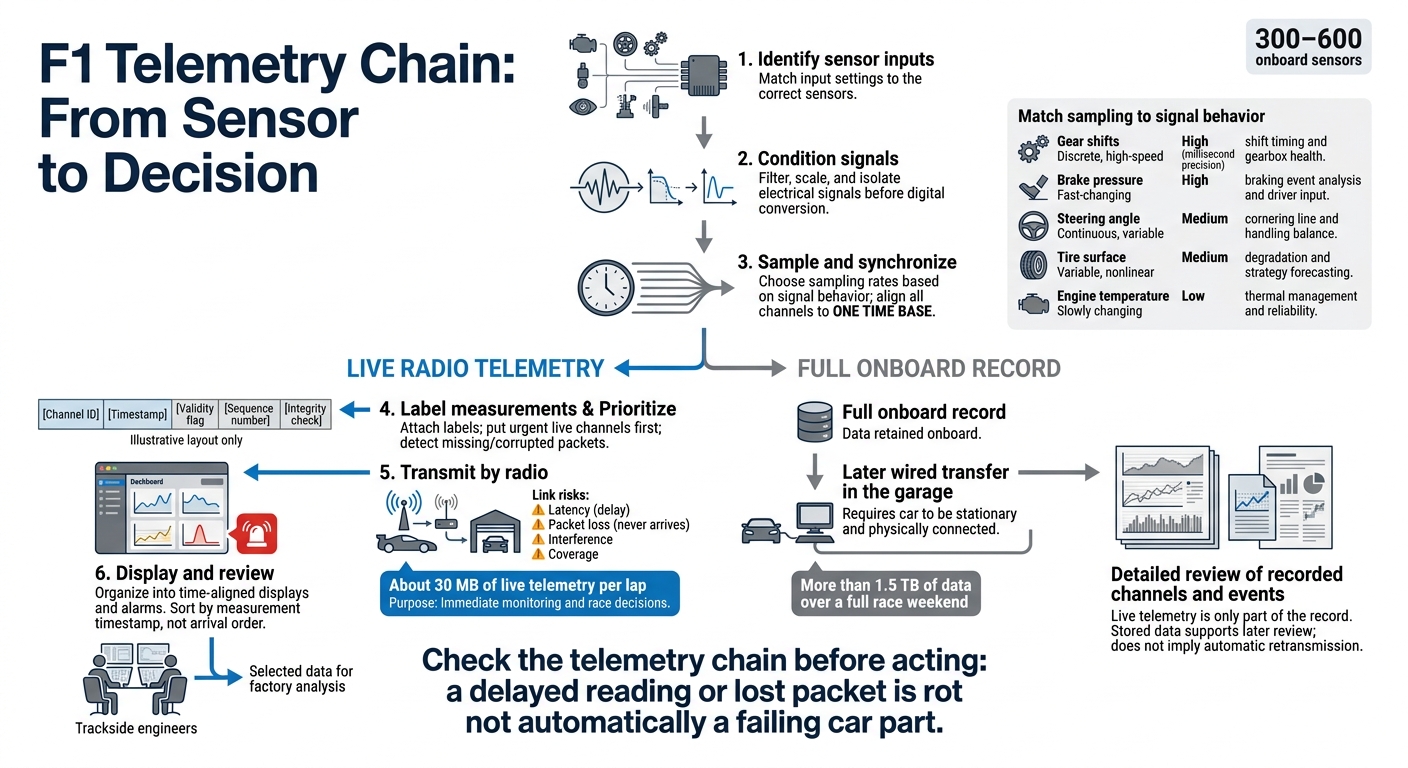
How F1 Telemetry Travels From Sensor to Screen
Condition and Sample Sensor Signals
Prepare Signals for Digital Conversion
Once the input settings match, the module filters, scales, and isolates each sensor signal before digital conversion. This prepares clean signals for synchronized sampling.
Choose Sampling Rates and Align Channels
Sampling rate should match how fast a signal changes. Gear shifts and brake pressure need millisecond precision, while temperature channels can be sampled more slowly.
| Signal | Signal behavior | Sampling priority | Why it matters |
|---|---|---|---|
| Gear shifts | Discrete, high-speed | High (millisecond precision) | Shift timing and gearbox health |
| Brake pressure | Fast-changing | High | Braking event analysis and driver input |
| Steering angle | Continuous, variable | Medium | Cornering line and handling balance |
| Tire surface temperature | Variable, nonlinear | Medium | Degradation and strategy forecasting |
| Engine temperature | Slowly changing | Low | Thermal management and reliability |
All channels must share one time base so engineers can compare events in the right order. With the channels aligned, the module can separate the live stream from the full onboard record.
Separate Live Data From Onboard Logs
A single car generates more than 1.5 terabytes of data over a full race weekend, but only about 30 megabytes of live telemetry reaches the pit wall each lap.
Live telemetry is a selected portion of the onboard log. It gives the pit wall enough data to make decisions, while the full log stays onboard for review. The module then packages only the live channels for transmission.
sbb-itb-7c68254
Package and Route Telemetry Data
Label Data With Channel, Time, and Status
After sampling the channels, the module packages each value with the context the garage needs to read it. Channel identifiers tell the receiver what the sample represents, timestamps record when it was acquired, and validity flags show whether it’s usable. In Formula 1, that context must stay attached to the data across hundreds of fast-changing channels.
Illustrative layout only:
Field What it tells the receiver Channel ID What the sample represents Timestamp When the sample was acquired Validity flag Whether the value is usable or affected by a fault Sequence number Where the message belongs in the transmitted stream Integrity check Whether the packet is intact
In general telemetry systems, sequence numbers and error checks help engineers spot missing or corrupted data.
Prioritize Messages and Detect Data Errors
When bandwidth is tight, the live stream must put urgent messages first without dropping lower-priority channels.
The routing layer handles that priority order and flags missing or corrupted packets. At the track, both tasks need to happen fast: critical signals go first, and bad packets get flagged promptly.
After ordering and checking the packets, the system passes them to the radio link.
F1 Telemetry: Explained! 📡 #DellTechnologies
Transmit Telemetry Over the Radio Link
The onboard transmitter sends selected data packets through the car’s antenna as radio telemetry. Trackside receivers decode the signal and pass the data to garage systems.
Latency is the delay between taking a measurement and making it available. Packet loss means data never arrives intact. Bandwidth sets how much data the link can carry, but coverage and reliability matter just as much. Interference can disrupt reception, while antenna placement affects how well the signal reaches receivers around the circuit.
After packets are labeled and prioritized, the module transmits only the subset needed live.
Handle Radio Link Interruptions
When the link drops, engineers need to flag missing or delayed readings. Otherwise, an old reading could be mistaken for live data.
The radio stream carries only a prioritized subset of the car’s onboard data. The full record stays onboard for a closer review later.
Compare Live Radio With Wired Garage Transfers
| Aspect | Live radio telemetry | Wired garage transfers |
|---|---|---|
| Connection method | Car antenna to trackside receivers and garage systems | Physical connection to onboard storage |
| Availability | While the car is running, subject to signal coverage | While the car is stationary and connected in the garage |
| Purpose | Immediate monitoring and race decisions | Detailed review of recorded channels and events |
| Data volume | Prioritized live subset | Full onboard dataset |
| Failure response | Flag missing or delayed readings | Review stored data after the session |
Stored data fills gaps after the session. Live radio supports action on track, giving engineers the packets they need for alert checks and on-the-fly race decisions.
Use Telemetry During Race Weekends
Once the live stream reaches the garage, engineers use it to make decisions. Telemetry servers organize incoming measurements into time-aligned displays and alarms. Readings are sorted by timestamp - not arrival order - so engineers can compare driver inputs with the car’s response and review what happened before an alert.
During practice, engineers tune the setup using brake pressure, steering angle, fuel flow, tire surface temperature, and aerodynamic load. In qualifying, the focus shifts to pace and consistency. During the race, reliability, tire behavior, and pit-stop timing take priority.
Check Alerts Before Taking Action
An alarm is a reason to investigate, not an instruction to act automatically. Engineers compare related channels and weigh tire age, lap-time delta, weather, race position, and fuel load. That context helps them judge whether a change signals a developing problem or normal running. Predictive tools can help, but any recommendation still needs a clear physical explanation.
Share Data Between Trackside and Factory Teams
The same data stream can serve both the pit wall and the factory. Trackside systems receive the live stream, which race and performance engineers interpret. Selected data can also support factory-side analysis, letting teams compare the car’s live behavior with historical data and simulated performance.
Verify Sources and Hardware Claims
Figures such as 300–600 onboard sensors, about 30 MB of live telemetry per lap, and more than 1.5 TB of data over a race weekend describe sensor scale and data volume - not analysis methods. When reading published material, keep those hardware benchmarks separate from claims about AI, digital twins, and simulation. Those claims describe how engineers analyze data rather than the telemetry hardware itself.
Conclusion: Check the Telemetry Chain
A telemetry reading is useful only if it stays identifiable, time-stamped, and intact from sensor to screen.
If a live reading looks wrong, trace the chain before acting. Use this checklist to find where it broke:
- [ ] Input identified: The reading comes from the correct sensor.
- [ ] Signal conditioned: The input is ready for sampling.
- [ ] Sample time-stamped: The measurement time is recorded.
- [ ] Message prioritized: The reading has live-stream priority.
- [ ] Packet validated: Integrity checks have passed.
- [ ] Trackside receipt: The reading reached engineering systems.
- [ ] Display updated: Engineers can see the reading on the trackside display.
- [ ] Data stored: The measurement is saved for later review.
FAQs
Can F1 teams adjust the car remotely through telemetry?
No. FIA regulations prohibit two-way telemetry. Data can flow from the car to the pit wall and factory, but teams can’t send remote commands back to adjust the car [2].
Engineers use live telemetry to track performance and plan race strategy. Drivers make setting changes themselves - including Energy Recovery System (ERS) modes and differential settings - using steering wheel controls, with guidance from engineers over the radio [2][3][4].
How do engineers distinguish sensor faults from car problems?
Engineers check live telemetry against physical models, digital twin simulations, established baselines, and readings from redundant or similar sensors. Automated checks flag corrupted packets, missing data, and timing irregularities. These issues usually point to transmission or sensor errors - not a failure in the car itself.
These comparisons help distinguish sensor faults from actual mechanical problems. When the data doesn’t give a clear answer, driver feedback adds context.
How do teams choose which telemetry to send live?
Teams don’t transmit every bit of raw data live. Bandwidth limits and the need to keep systems running efficiently mean onboard processing must compress and prioritize information before sending it. The focus is on metrics engineers can act on: tire degradation, fuel consumption, engine temperatures, and energy recovery status.
Algorithms filter out noise so critical, validated data reaches the pit wall and remote operations rooms. This helps engineers make quick decisions without overloading systems or staff.